As a CAD beginner, have you ever been in a situation where you got PDF drawings from the client and were unsure how to edit them? It’s the most common situation that most CAD professionals face in their careers. Clients usually share the sketches and drawings in PDF format, which is the most common tool for sharing files. Remember that a PDF is not easily editable, which makes the entire thing difficult. So, the use of third-party tools or the conversion of PDF to DWG format becomes necessary.
DWG is the native format for CAD-based drawings. It contains all the dimensions, lines, sketches, and layers. Above all, you have powerful control over a DWG format, with editing. You can change dimensions, modify walls, update the elements and layouts without changing the original intent of the design.
As a beginner in this field, you need to understand the importance of DWG format, different ways to convert PDF into DWG, common challenges and best practices to avoid these challenges. That’s how you can become an expert in this field. In this blog, we will discuss them all.
Understanding PDF and DWG File Formats
To understand completely why the conversion of PDF into DWG is essential, it is necessary to understand both in detail.
|
|
DWG |
| A PDF is a file that stores text, images, and graphs. As said earlier, its editing is not easy. You can share it with others without fear of any changes because it remains the same across systems even after sharing. Due to its solid pattern, it is the most usable format for sharing files across various industries. | DWG is the native format for CAD software. Engineers, architects, and CAD designers use this software to store designs, elements, layouts, etc. It is easily editable. Team members can make changes in designs by moving lines, sketches, etc. All in all, it makes the process easy. |
Why Converting PDF to DWG is Important
Conversion of PDF into DWG brings many important benefits. Some of them are given below.
Accuracy
Conversion of a PDF file into a DWG file enhances the accuracy of the design and explains the wall elements, windows, and other dimensions more clearly. PDF files are just scanned images of the project design, but you cannot measure their components.
Enhance Scalability
The DWG files are more scalable. Let’s make it clearer with a detailed explanation:
Have you ever zoomed in on any picture or PDF file? You must have seen that the zooming of the text images makes that specific portion blurry. The DWG file format does not have this issue! You can easily zoom in on the elements and layouts without any quality loss.
Easy Editing
The most important feature of converting a PDF into CAD is that you can easily edit the parent file. PDF is just like a static document, which cannot be moved, and you cannot make any changes in it, but the DWG format makes designing easier by enabling the user to edit it.
Looking to understand more about CAD formats? Explore our guide on different types of CAD files.
Common Scenarios Where PDF to DWG Conversion is Needed
The following are the common scenarios that require the conversion of PDF into DWG
Renovations Designs
When a client approaches you for renovation purposes and provides you with a PDF file, you have to convert it into the DWG format. It is necessary to make the edits and prepare a design that shows the required renovations on specific points.
Editing Old Drawings
Plans that were saved before can be brought back and converted into DWG in your CAD software. This makes the entire process seamless and saves the hassle of creating a new plan from scratch.
Quality Assurance
If you have to check the exact measurements of the design elements for quality assurance, then the DWG format is highly suitable.
How to Convert PDF to DWG Step-by-Step
The following is a step-by-step guide.
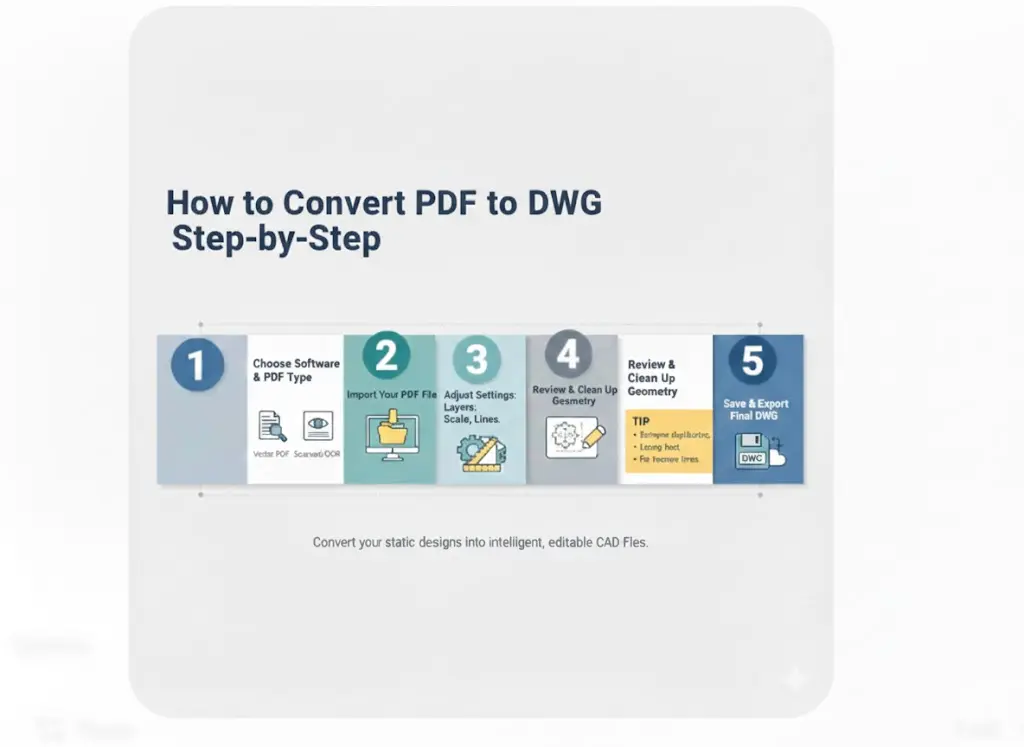
Step 1: Choose reliable PDF to DWG conversion software
The first step is having an idea of what type of PDF you have. This is very important to know because the conversion of various types of PDFs varies in certain aspects. Furthermore, it is essential to choose an ideal converter tool. Multiple types of converters are available for the task. For vector-based PDF, you can use specialized CAD-based features. For a scanned PDF, OCR (optical character recognition) is best.
Step 2: Import your PDF file
The next step is to import the PDF into the CAD software. Open the program you have chosen and upload your final design file.
Step 3: Adjust layer, scale, and line settings
Now, adjust the dimensions from the PDF drawings to avoid any clashes or errors during the conversion.
Step 4: Review and clean up converted geometry
Click on the conversion command and convert the PDF elements into the DWG. If needed, adjust geometry manually and review it again to avoid errors and mistakes.
Tip: When you do all this, remove any duplicates, group text labels, fix broken lines, etc.
Step 5: Save and export the final DWG file
Now, convert your file into the desired format and save it for further editing and analysis.
If you want to improve your drafting accuracy further, read our blog on design drawings vs. shop drawings.
Choosing the Right PDF to DWG Converter
Choosing the right converter is essential for maintaining the original intent of the design. Not all converters perform the task with exceptional accuracy. Some convert the images into lines by changing the original dimensions. They cannot differentiate between the text and the lines. As a result, the final file is a mess of lines rather than the design sketches. Therefore, always choose the best converter tool that has good reviews, is tested, and approved by experts.
Benefits of Converting PDF to DWG
The following are the main benefits of converting PDF to DWG.
Editing Control
The DWG format provides full control for editing, allowing you to move lines, change dimensions, and duplicate elements and layers.
Design Originality
PDFs are highly suitable for sharing and maintaining data security. However, it loses the dimensions, object properties, and other details with ease. So, converting the PDF back to DWG maintains original design integrity and element characteristics.
Team Work
As these formats are easily editable, this drives team collaboration. It allows multiple team members to work on the same drafts simultaneously. This practice improves productivity and streamlines the workflow.
Best Practices for PDF to DWG Conversion
Our experts have summarized some tips to proceed with the best and smooth conversions.
- Try to use a vector-based PDF because it improves the conversion process and saves time.
- If a PDF file contains text, then enable the OCR feature to make the text editable.
- Properly layer the objects to make the PDF conversion smooth and clean.
- Sometimes conversions create a messy text in the final DWG version. Therefore, always check the text and retype the annotations.
Get accurate, clean, and editable DWG files—start converting your PDFs with confidence today!
Common Challenges and How to Avoid Them
Challenges |
Solution |
| Large PDFs aren’t easy to convert | Split the PDF; it is easy to manage small PDF files |
| Sometimes, the final converted file has mistakes | Run an audit by CAD software for automatic error detection and fixing |
| In some cases, converters do not work | Try to choose a better converter tool |
| The converted file has poor quality sometimes | Go for the manual tracing or professional vectorization |
Conclusion
Understanding the conversion of PDF to DWG format is essential for professional drafters. It helps them work on the previous designs while maintaining their original intent. Different tools and converters are available for this task. As for the online conversion tools, they are not considered safe. That’s because they risk confidential document security. So always choose dedicated installable software for conversion.
FAQS
What is the difference between PDF and DWG files?
PDF files are the most common format to share documents because they remain the same across computers and systems. However, editing the PDF format is much more difficult. On the contrary, DWG format is the native version for CAD-based drawings and is easy to edit. They maintain the integrity and original intent of the design.
Can I convert DWG to PDF as well?
Yes, you can convert DWG to PDF format and vice versa with the help of tools.
What’s the best software to convert PDF to DWG accurately?
AutoCAD, Scan2CAD, CADsofttools PDF to DWG Converter and Able2Extract Professional are some of the best tools for the conversions.
Is online PDF to DWG conversion safe?
Many free online tools are available for this task. However, they compromise the privacy and security of confidential file documents. Therefore, always use the dedicated desktop software, which ensures accuracy, quality control, and maintains data security and integrity.
How can I ensure my converted DWG file retains accuracy?
You must follow the pre-conversion practices and run an audit after the final conversion to get rid of any unnoticed errors.