Are you confused about the different specializations in CAD drafting and struggling to know which is best for you? Before you make a decision, it is essential to know about CAD drafting in detail so that you can take the right path towards your professional career.
In this blog, we’ll explore everything about CAD Drafting specialization, including its definition, options, JDs of CAD drafters, their salaries, skills, qualification road map and many more; so keep reading to choose the right path!
What is CAD in Construction?
In the construction world, CAD is an abbreviation of computer-aided design, meaning the use of software to generate, modify, analyze, and optimize building or system designs. Using CAD, you can draw anything on screen, whether simple building blueprints or complex machine parts. In other words, CAD has replaced the hand-sketching task in the construction sector as it provides you with digital drawings which are precise, accurate and easily adjustable if plans change later.
When you dive into the world of CAD, you hear the term “AutoCAD”, which is the most common tool for 2D drafting of architectural and engineering plans. Similarly, other software exists, named SolidWorks or CATIA; they handle 3D modeling in the construction world.
When Was CAD Started?
CAD has a long history; the term CAD was introduced in 1959. Its early research started between the 1940s and 1950s; however, an actual rise was seen in the 1960s when professionals started using it in engineering drawings.
Remember that it is a story of evolution, from simple drafts to advanced modeling.
What is Advanced CAD?
It is now more than basic drawings. In other words, today CAD involves 3D parametric modeling and integrated features. Modern CAD offers building parts and assemblies in 3D, along with parametric dimensions that drive the construction design. Furthermore, you can work on motion simulation, test pressure, and generate complex curves using advanced CAD.
Moreover, CAD has become integrated with BIM (building-information modeling). This means that, using CAD, you can integrate design data into a 3D project model made by BIM. Additionally, you can automate tasks to save your time and effort, too.
What is CAD Drafting in Construction?
It is the process of using CAD software to create comprehensive technical building or system drawings and models. Using CAD, drafters turn simple design ideas into detailed plans, so teams use them for construction purposes.
In CAD drawings, you get floor plans, layouts of mechanical parts, wiring diagrams, and much more. Whether you are working on homes or offices, CAD drafting helps in turning paper sketches into buildable plans.
Who is a CAD Drafter?
A CAD drafter is a professional who creates technical drawings by using CAD software. In other words, they make a link between a designer and a builder in the construction project. A study describes that a CAD drafter is a professional who converts an engineer’s or architect’s design into technical construction drawings.
They specialize in what they do: architectural drafting, mechanical drafting, etc. During drafting, they ensure that all the dimensions, notes, and symbols are correctly included in the plan.
Responsibilities of a CAD Drafter
A CAD Drafter’s day-to-day duties include:
- Drawing detailed plans with CAD software
- Revising drawings from sketches or instructions
- Adding construction details
- Specifying materials and dimensions.
- Ensuring specifications, like wall thickness or bolt patterns, match engineering requirements.
- Keeping drawings updated after changes
- Maintaining drawing databases
Expertise a CAD Drafter Should Own
To become a professional, reputable CAD drafter, one should have a mix of technical plus soft skills. Technically, a CAD drafter should be an expert in operating software. Also, they can understand drafting standards. Above all, strong attention to detail is required; it is needed to catch errors or gaps in the plan early.
Other skills include:
- Blueprint Reading
- Mathematics and Geometry:
- Computer Literacy
- Communication
- Problem-Solving Skills
What Is the Salary of a CAD Drafter in the U.S.?
What you will earn after becoming a CAD drafter depends on
- Which region do you work in?
- What is your experience?
- What expertise do you have?
- Which industry do you specialize in?
Below is the table showing salaries from some studies:
| Category | Salary / Data | Source / Notes |
| National Salary Range (2026) | $55,000 – $65,000 per year | Early 2026 national estimates |
| Median Annual Wage | $65,380 | U.S. Bureau of Labor Statistics |
| Average Salary | $60,127 | ZipRecruiter (2026 estimate) |
| Entry-Level Salary | Low $50,000s | Starting salaries in many markets |
| Experienced CAD Drafters | $75,000+ | Higher with experience or specialization |
| San Francisco Average | ~$76,400 | High demand and cost of living |
| Washington D.C. / California | Higher than the national average | Strong regional demand |
| Georgia Average | ~$73,500 | Slightly below the national average, according to one source |
| Rural / Low-Cost Areas | Lower than the national average | Due to the lower cost of living |
How to Become a CAD Drafter?

If you want to become a CAD drafter, note that this involves formal training and practice. Most drafters complete a 1–2 year program after high school. This could be an Associate of Applied Science in drafting or a shorter certificate/diploma from a community college or technical school.
What Does CAD Drafter Course Work Cover?
Coursework usually covers:
- Drafting principles
- CAD software, like AutoCAD
- Computer graphics.
Some programs let students specialize (e.g., architectural drafting or mechanical drafting) even before they graduate.
The Worth of Experience in CAD Drafting Career
When you want to become a CAD Drafter, hands-on-experience should be your focus from the very first day. Pursue internships or do part-time jobs in your field to build your portfolio. By doing so, your practical skills develop as you work with professionals in the field and read project specifications of your own.
All About CAD Drafter Certifications and Credentials
Certifications aren’t always mandatory, but they strengthen your resume. They signal to employers that you’re competent with key CAD practices and industry best practices. Notable ones include Autodesk’s Certified Professional credentials, for AutoCAD, Revit, etc., and the National Institute for Certification in Engineering Technologies (NICET) certificates.
CAD Drafter Degrees and Diplomas
Many CAD drafters hold associate degrees or diplomas. No doubt, they are sufficient to start, but having a certification with them is a plus point. Also, there are many in the sector with a professional bachelor’s degree. Above all, you should focus on practical courses as they teach drafting software and standards.
Major CAD Drafting Specializations
CAD drafting spans many fields. Here are 5 major ones commonly considered in the industry:
● Architectural Drafting
If you become an architectural drafter, you will be responsible for:
- Building design
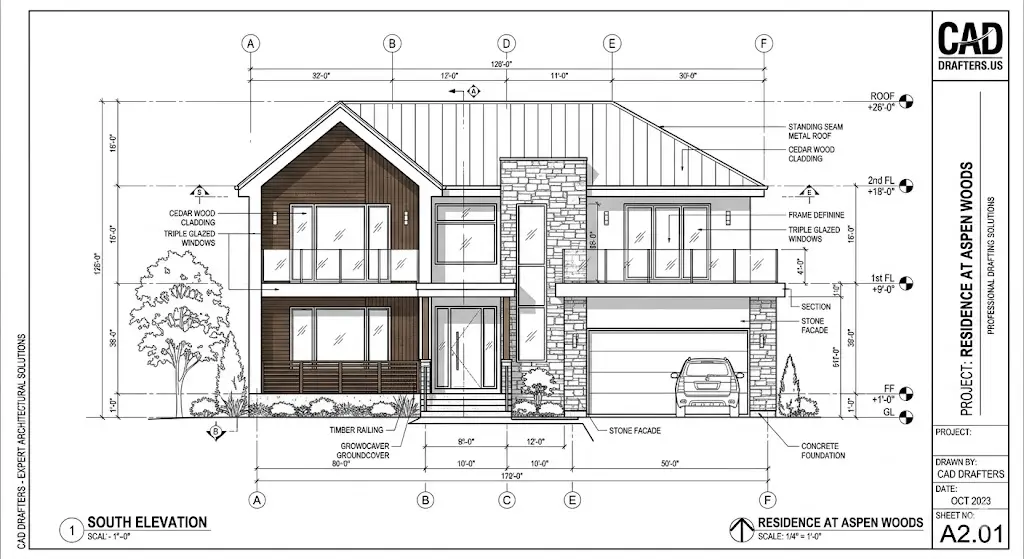
- Drawing floor plans, elevations, sections, and detailed components
Your specialization can be in a particular type of construction, like residential or commercial, or it can be by material type, like wood or steel work.
Regarding skills, you must know tools, like AutoCAD and Revit, as well as local and national building codes. Check out our blog, What Is Architectural Drafting?, to know more about this specialized CAD drafting field!
● Civil Drafting
Second come civil drafters who are responsible for drawings related to infrastructure and land. They work on site plans, road layouts, bridge details, and topographical maps. Using survey data and civil engineering specifics, they provide plans for construction projects.
Regarding software, they use Civil 3D or MicroStation to create drawings that guide earthmoving, utilities installation, and road construction.
● Mechanical Drafting
When one becomes a mechanical drafter in the construction world, they are responsible for:
- Handling machinery, tools, and mechanical systems
- Create comprehensive drawings of parts
- Generate assembly diagrams
- Work on tool layouts
- Specify dimensions, materials, tolerances, and fasteners.
During drafting, they use 3D modeling software, like SolidWorks, Creo, and CATIA, to ensure parts fit and function perfectly.
● Electrical Drafting
As the name shows, this field is all about electrical work. An electrical drafter is responsible for
- Wiring diagrams
- Panel layouts
- Control schematics
Their electrical drafts show the complete wiring for a power system or the circuit layout for a building’s lighting system. And they use tools, like AutoCAD Electrical or Revit MEP, during drafting.
● Shop Drawings
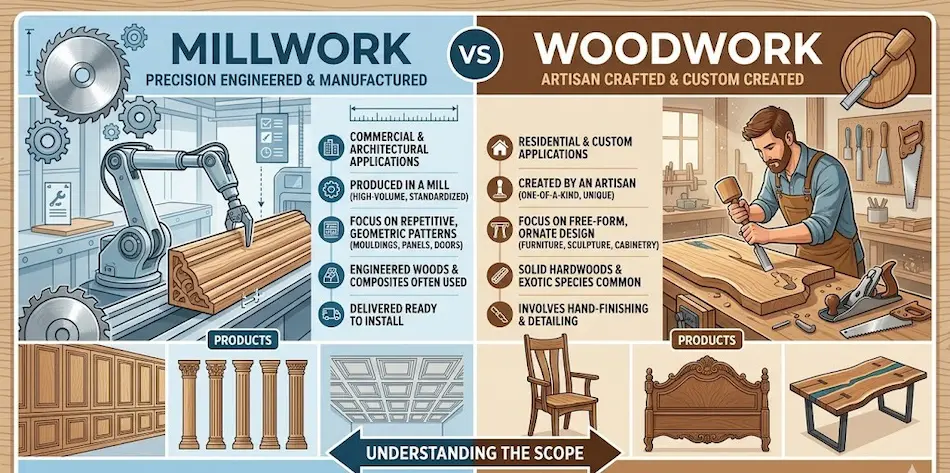
They are the comprehensive fabrication plans of contractors or manufacturers. Shop drawing drafters understand the difference between design drawings and shop drawings; unlike design drawings from architects, shop drawings show exactly how components are built and installed.
In shop drawings, you get precise dimensions for steel beams, ductwork, cabinetry, and so on. Remember that shop drawings often come after the design is set, to guide fabrication shops.
What Factors to Consider When Choosing a CAD Specialization?
Picking a specialization is like choosing a favorite instrument in a band. It should fit your skills, interests, and the demand. Here’s what to factor in:
● Industry Demand & Career Path
Some industries grow faster. For example, BIM modeling in construction is booming, as architects or contractors need 3D coordination. If you’re drawn to buildings and there’s lots of development in your area, architectural drafting might promise steady jobs.
Furthermore, mechanical and electrical drafting are always in demand in manufacturing and infrastructure. Look at local job postings; which specialties do employers keep seeking?
● Software Specialization
Different fields favor different tools. Civil drafters may need Civil 3D or GIS software, while mechanical drafters use SolidWorks or CATIA. Consider what software you prefer learning.
If you prefer visual 3D modeling, mechanical or architectural might suit you; if linear schematics, like plans, circuits, attract you, civil or electrical could be better.
● Skill Set Alignment
Play to your strengths when choosing the one option from CAD specializations.
- If you are good at spatial visualization and understanding building layouts, architecture could fit.
- If you are fascinated by machines or want to work on product design, mechanical drafting lets you create gadgets and tools.
- Furthermore, if you enjoy electrical systems, electrical drafting is the target.
Simply put, align your background, you studied mechanical or architectural tech, and your passion with the specialization.
● Future Trends
Always think ahead. BIM/3D skills are surging in architecture and engineering. If a field is moving toward automation or smart tech, getting into that now could set you up later.
Research which specialties are adopting AI, parametric design, or sustainability features. Those are clues that skills will pay off.
● Company or Project Requirements
Suppose you have targeted a specific company or a mentor. What you need to do is consider their focus or requirements. Knowing your clients or projects perfectly enables you to tailor your focus points accordingly, paving your path towards success.
Future Trends of CAD Drafting Career in 2026
The CAD drafting field is evolving rapidly. Here are key trends shaping 2026:
● AI-Augmented Workflows
Today, AI has been mixed with CAD software and tools. Using modern tools, you can automatically get fixing suggestions, detect issues, and identify errors in dimensions. Furthermore, you can draft AI-assisted plans for a construction project and later refine them to meet your standards. Human drafters are not beatable, but AI is playing a great role in speeding up the process.
● Cloud-Based Collaboration
Now is the time of real-time teamwork without sitting at a single table. Today, professionals use cloud platforms to conduct meetings, share project data, revisions and updates online.
Your team can work on a single model while sitting in different places. Using this approach, contractors now get instant feedback from clients, saving time and money.
● Shift to 3D and BIM Integration
2D plans alone are less common. BIM (Building Information Modeling) drives construction projects now. CAD drafting increasingly happens inside 3D/BIM environments, like Revit. Even civil and mechanical fields use 3D models for coordination.
● Generative Design
AI-driven generative design is an emerging trend in the construction world. Given constraints, like space, materials, and load, software generates thousands of design options for a part or building layout. The drafter then selects the best one. It’s a new way of designing, especially in architecture and product design.
● Rise of Human-in-the-Loop Roles
Rather than being replaced, drafters are becoming curators of AI design. You’ll still oversee the design intent, validate AI outputs, and add the creative judgment machines lack. This trend will make drafting more strategic, integrating monitoring, automated checks and focusing on complex problem-solving.
● Industry-Specific Toolsets
CAD software is more specialized. For instance, architecture has tools, like BIM 360 and Solibri, for code checking; manufacturing uses Teamcenter PLM integrations; electrical design leans on AutoCAD Electrical or Revit MEP.
● Sustainability Metrics
With green building codes, CAD tools now include sustainability features. Drafters may use software that evaluates a design’s energy efficiency or carbon footprint as they draw. Furthermore, weighing material impacts in CAD is becoming common in civil and structural drafting.
● Mobile & Immersive Tech
Virtual Reality (VR) and Augmented Reality (AR) are entering CAD workflows. Some architects and engineers use VR headsets to walk through a building model. Drafters might mark up plans or review models on-site with a tablet or AR glasses. This makes design reviews more interactive.
Skills Required to Stay Leading in the Market
To thrive amid these trends, CAD drafters need to upgrade their skill set:
● AI Literacy & Prompt Engineering
Learn how to use generative AI tools and CAD automation. This doesn’t mean replacing drafting skills, but knowing how to give the right commands or prompts to design software.
● BIM/Revit Proficiency
Strong BIM skills are a must. A study notes that as BIM adoption grows, expertise in tools like Revit and Navisworks is in high demand. Being able to create, navigate, and coordinate Revit models will set you apart.
● Scripting or Automation
Learning a bit of programming, e.g., Python, Visual LISP, or Dynamo for Revit, allows you to automate repetitive CAD tasks. For example, writing scripts to batch update hundreds of drawing sheets, or to automate clash detection.
● Parametric Modeling
Modern CAD is parametric, or dimensions drive geometry. What you need to do is get comfortable building and modifying parametric 3D models—similarly, practice with tools, like SolidWorks’ parametric features or Revit families. Knowing how to set up relationships between parts is key.
● Collaboration and BIM Coordination
Become adept at coordinating with other disciplines in a BIM workflow. This means skills in clash detection software, e.g., Navisworks, and online collaboration platforms. Soft skills, like team communication and version control, are crucial too.
● Continuous Learning
Considering how fast tools change, a commitment to ongoing learning, new CAD versions, and new trends is itself a skill.
How CAD Drafters’ Expertise Improves Construction Project Efficiency
Hiring an expert CAD drafter pays off in practical ways on a construction project. Here’s how their skill translates into efficiency and savings:
● Enhanced Precision & Accuracy
Expert CAD drafters produce highly accurate drawings that align exactly with design intent. They use templates, standards, and built-in software checks to minimize errors. Fewer drafting mistakes mean fewer field mistakes.
● Cost Efficiency & Reduced Rework
With accurate drawings, costly rework is greatly reduced. The CAD experts cited by AEC firms see lower rework costs and more predictable budgeting. In fact, clear shop drawings and correct models can cut change orders and material waste. Saving just one major rework can more than pay for the drafting budget.
● Accelerated Timelines
Skilled drafters turn projects around faster. According to industry sources, operations see faster turnaround times and reduced revision cycles when using modern CAD drafting. Quick, automated tools, like batch dimensioning or standard detail libraries, mean drawings go from concept to issue much quicker, shaving weeks off schedules.
● Improved Collaboration & Compliance
Expert drafters facilitate better communication. Their clear, standardized drawings ensure all teams, including architects, engineers, and contractors, see the same information. This clarity helps everyone stay on code and regulation requirements. They often coordinate BIM models, too, which keeps all disciplines on the same page.
● Scalability
As project demands grow or change, professionals can scale their work. You don’t have to scramble to train someone in-house; you can rely on a drafting partner. This flexibility is a benefit of using specialized CAD Drafting services with experience handling large workloads and complex standards.
● 3D Visualization
Expert drafters often produce 3D models or visualizations. These not only help find errors earlier, but also help clients and stakeholders understand the construction project. Better visualization reduces questions and delays during construction.
Ready to improve the accuracy and efficiency of your construction project?
FAQs
What is the difference between 2D and 3D CAD drafting?
2D CAD drafting creates flat drawings, like plans, elevations, and sections, with lines and curves. It’s like drawing on paper, only on a computer. On the other hand, 3D CAD drafting builds volumetric models with length, width, and depth.
Which CAD specialization is best for residential projects?
Typically, Architectural drafting is the best fit for homes and residential buildings. Architectural drafters specialize in building plans and know residential codes. They produce floor plans, elevations, and detailed layouts tailored to housing.
In contrast, civil drafting might handle site grading for the lot, and structural drafters check beams/foundation. But for house layouts, architectural CAD is your go-to specialization.
How does BIM coordination relate to CAD drafting?
BIM (Building Information Modeling) coordination involves managing the 3D model data for an entire project across disciplines. CAD drafting focuses on creating specific drawings or models.
CAD drawings are often exported into the BIM model. For example, a CAD drafter can produce HVAC duct layouts, which are then merged into the overall building model by BIM teams.
Can one CAD drafter handle multiple specializations?
A well-rounded drafter can work in more than one area. Each specialization has its own software and standards, so switching back and forth can be challenging. Firms hire drafters who focus on architectural, mechanical, or electrical exclusively.
Is CAD drafting difficult?
CAD drafting has a learning curve, but it’s very learnable with practice and training. The technical software can feel complex at first, but structured courses teach you step-by-step. People with attention to detail and spatial thinking tend to pick it up faster.
What should you learn after CAD drafting?
Once you have basic CAD skills, consider these next steps:
- Advanced 3D modeling to tackle complex designs
- BIM for integrated project work and project management fundamentals
- Learn Revit or another BIM software to coordinate designs
- Explore simulation tools, like Dynamo or Rhino, to expand creativity.
- Advanced certifications, like AutoCAD Professional, Revit, or industry-specific ones, also boost your career.
Conclusion
So, choosing the right CAD drafting specialization means matching project needs with the drafter’s expertise. We’ve covered what CAD is, the roles and skills of drafters, top specializations, including Architectural, Civil, Mechanical, Electrical, and Shop drawings, and how to decide your path.
Remember that CAD drafting brings precision, efficiency, and clarity to any construction project; it’s the reason teams deliver better, faster, and more cost-effectively.
At the end of the day, expert drafting saves money and headaches. That’s why CAD Drafting services from CAD Drafters can be your best solution. Our professionals handle every detail, ensuring your designs fit together perfectly before construction begins.
Whether you need clear architectural plans, detailed mechanical layouts, or accurate shop drawings, we’ve got you covered. Trust our team to improve your build quality while knowing your project drawings are in expert hands!