Are you stepping into the world of CAD drafting and feeling overwhelmed due to complex file formats? No worries. It’s natural. When you start learning a new field, you experience a lot of challenges, but believe me, you have chosen an extraordinary field that will be beneficial in future.
Many beginners think that CAD files are just the digital form of architectural drawings and sketches. But, this is more than this. Have you ever tried to download a picture into a Word text document? You must be thinking, what a silly question this is. Text docs do not support pictures. We used JPEG for pictures. Yes, right. That’s what I want to explain. CAD documents support digital CAD plans. Over the years, many revolutions have been made in these files, and the 2025 versions have too many AI-supported features, which have made the editing, automation of any element or layout easy and save a lot of time.
Let’s delve into the details to clearly understand what is a CAD file? , properties and functions.
What are CAD Files?
CAD files are the documents that contain all the information about your construction projects. From 2D sketches to 3D models and final finishes, these files have all elements, floor plans, layouts and other systems. The following points explain the detailed information that these files provide.
- These files provide information about the geometrical dimensions (2D and 3D)
- Assembly connections, which explain how different parts of the project will interact with one another
- Specifications of materials, which explain the type of material, such as paint, concrete, or lumber, would be required for a construction project.
- These files also have metadata such as IDs, names and layers to give an organized look of the design.
- Those files of CAD, which are used for the products’ manufacturing, have detailed rendering information to enhance the visualization, surface finishes and design intricate details.
The Importance of CAD Files in 2025
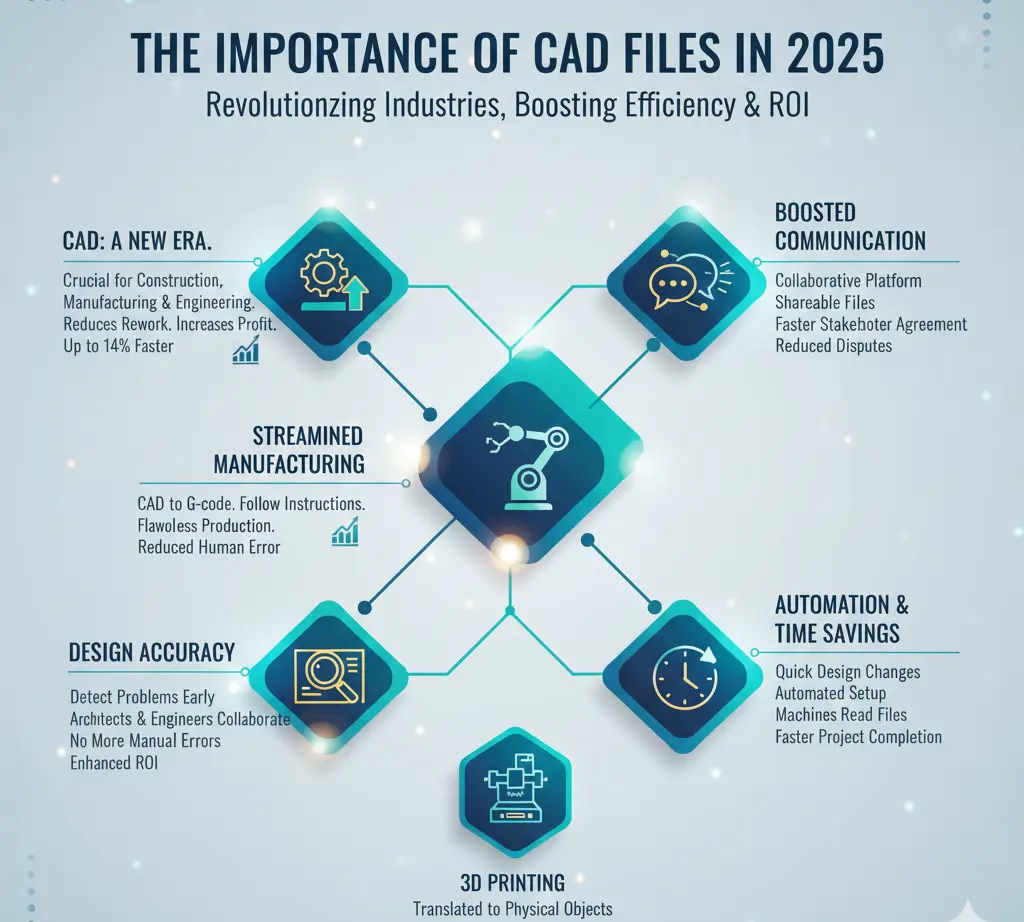
Due to the revolution in the construction, manufacturing and engineering industry, files of CAD software have become more important than ever in 2025. Whether it is a car manufacturing, a piece of jewellery, intricate furniture details, construction or the automobile industry, nothing can work without CAD designs.
Here, the question arises: how were these industries working before CAD launch? Definitely, they were working. But the ratio for rework was high, and the profit margin was very few. Stats show that CAD design has reduced the development and production time up to 14%, and enhanced the team collaboration, which optimizes the cost efficiency and increases ROI.
Let’s discuss how these CAD-based files are helpful for these industries.
Streamline Manufacturing
CAD-based documentation or files have streamlined the manufacturing process of products. When a CAD drafter designs shapes for any product manufacturing, then these files are turned into special instructions called G-code. This G-code serves as a guide for the machines to follow the instructions step by step and make the cuts to develop the desired product in the fastest way. This process reduces the human involvement and ultimately the human-based orders. Manufacturing is based on machines by taking guidance from these files, and the whole process goes smoothly, quickly, perfectly and automatically in the real world.
Boost Fair Communication
CAD files are an important source of collaboration among stakeholders. Do you want to know how? Let’s explain.
Any construction or product manufacturing work is done with the help of many professionals and team members. If we talk about construction, then engineers, architects, interior designers, construction contractors and labor all work to complete a project. These files are shareable and increase communication.
Design Accuracy
Accuracy and precision are the most crucial factors in all product manufacturing and construction processes. These files have made this possible to proceed with the manufacturing and construction with accurate designs. Traditional methods, such as sketching the lines on paper for each element, layouts and plans, have more chances of human errors, while CAD-based designs have reduced these errors and bring more precision.
Cost Optimization
Errors in the design and stakeholders’ disputes on the site are the main causes of rework and ultimately more spending. CAD documents have resolved these issues. Now, stakeholders can detect potential problems even before the actual work starts and collaborate through CAD-based files and start work with accurate designs on which they all agree. This reduces the rework and enhances the cost optimization and ROI.
Automation Saves Time
The traditional method of making changes in the designs, such as redrawing, checking dimensions or creating designs, has become outdated. Today’s market is very competitive and requires quick fixation to complete the project on time. CAD documents have resolved these issues; now the software can make changes in the design with just a few clicks. When these CAD files are sent to the machines OR printer, automation eliminates the need for manual setup. These inform machines read the information from the files and convert it into the product, reducing human error.
Read our detailed guide here for more information: Difference between design drawings and shop drawings
Types of CAD Files
These files are of different Types. In this section, we will explore all types of files and their details.
2D CAD Drawing Files
These are the additional file formats that have been used for many years. They have been used in CAD since 1989. The most important CAD file types for 2D CAD are given below
| DWG
It is AutoCAD’s native format, which was introduced in 1982. It is responsible for storing 2D drawings and and not compatible with 3D data. It is widely used for mechanical and architectural designs that contain the annotation, layers and vector entities. It is very useful for Autodesk-generated 2D drawings; however, it lacks many properties
|
DXF
It is also an Autodesk-based file format which was introduced to exchange data. It is widely portable for CAD, CNC and graphics software. It is very helpful for laser cutting, PCB design and other applications. |
Some Other File Formats for 2D Designs
Format
|
Usage |
| DGN | Civil engineering |
| Universal, non-editable format | |
| SVG | Web standard format |
| ECAD | Electronics design |
| EDIF | Neutral format used for various designs |
3D CAD Formats
3D CAD formats come with more advanced features in designs with intricate information. The following are the main files that are used for 3D designs.
STEP
STEP is the most important format that is used for 3D data exchange. It was introduced in 1994, and it contains data like assembly, materials and tolerances. Although it does not include step-by-step information however it gives detailed information about the final design. The engineers mostly use this for product manufacturing.
IGES
This was first introduced in 1980 and was adopted by some government agencies. This supports the 2D drawings; however, it is best for 3D data exchange that supports continuous development and collaboration between team members who are using different file formats to work on 3D models.
Some other important 3D file formats are given below.
| 3D File Format | Usage |
| CATPart (CATIA), SLDPRT (SolidWorks), IPT (Inventor) | Native 3D CAD formats |
| (.x_t/.x_b), ACIS (.sat) | Kernel formats |
| STL, OBJ, 3M | Polygonal mesh formats |
| 3D PDF, JT | Visualization/lightweight formats |
BIM and Architecture Formats
BIM natural format is widely used for architectural designs and the construction process. Whether it’s residential, commercial industrial infrastructure construction, the file formats are the same for all. Some of the important formats are RVT, IFC, PLN, NWC and NWD, etc.
Neutral and Sharing Formats
Neutral and sharing formats are used at the universal level to support 3D formats and sharing. For example, if you and your team member are working on different computers and your team member does not have a file support setup for CSAD files, then these neutral formats can give access to the files. STEP, IGES, IFC, STL, and OBJ are most commonly used CAD file formats for data exchange and sharing.
Choose File Type Effectively
Choosing the right file type is crucial for sharing data among different team members on varying platforms. The following are a few tips to choose the best format.
- To save the whole history and retain the design, always use the native format.
- You must convert your design into the STEP format, which is neutral and efficient for sharing these files.
- When working for a customer, always find out their preferred format and choose that particular file.
- If you are working to build a 3D format for products, then always ask your manufacturers what format they are convenient to work on and then choose that file format.
- If you do not have any information about the other parties’ SUPPORTED system, then always choose neutral shareable file formats.
Practical Uses of CAD Files
These files have become crucial for the process of engineering, construction, architecture, and product manufacturing. The following are the main uses of files across various industries.
Architect
Building blueprints, floor plans, and structural assembly are all explained in detail by the architects. BIM professionals translate them into 3D models. These 3D models are converted into files, and architects share them with other team members, including engineers and construction contractors.
Engineering
Engineers use 3D prototypes and get detailed information on manufacturing any part. This streamlines the work and optimizes the cost.
Product Designing
Product designing is another industry that has a wide use of CAD drafting files. Product designers develop the prototypes of their products, in which they explain material specifications, design details, colour combinations, etc. In short, they give a real-world view of their product to their client even before manufacturing it. This is helpful to gain the client’s trust and provide them with the chance to make any adjustments in advance.
Construction
Construction is another field that widely uses CAD-documented files. 3D modelling allows the construction contractors to view their buildings even before the construction starts. They share these cloud-based files with their team members so that all the stakeholders agree on the same design.
Product Manufacturing
CAD documented files are translated into G-codes, manufacturers implement these codes in their product manufacturing machines, where these machines get the instructions and build the product, reducing the chances of human errors.
3D Printing
The 3D printing industry also uses CAD-based files, where the information in these files is translated into physical objects.
Key Challenges with CAD Files
The following are some key challenges when working with CAD-based files.
- When working with construction projects, the integration of CAD generated files with the construction software is a challenge due to different formats. However, using neutral and data transport formats can resolve this issue to some extent.
- When teams convert files and manually enter data, data incompatibility issues arise.
- Large files are difficult to share and take time to download.
- Sometimes fear of security risk rises due to sharing these files.
- Version control issues also take place when multiple team members work on the same design without updating the files.
- Conversion of these files into other formats can compromize the accuracy.
How Professionals Manage CAD Files
If you are new to this industry, then you must know how to manage the CAD file so that your files give a professional look and leave a good impression on your team and clients. The following are a few tips to manage the files effectively.
Centralize Storage
Always store your files in a single location, which may be a product data management, product life cycle management or cloud storage.
Apply Access Control
Always allow authorized users to have access to or modify changes to the files. It prevents intellectual property from being scammed.
Organize Files with Names
Always name your files properly. If you are working on multiple projects, then naming files with a specified convention helps to locate that file easily.
Manage Data Security
Always remove unnecessary details when sharing the files with other team members and protect the information using different data protection software.
Ready to streamline your CAD operations and security? Contact our experts today to discuss your specific file management challenges.
Our Verdict
For the construction, product manufacturing, and printing industries, CAD files are a crucial information source and an invaluable asset. To protect the intellectual property included in these files and guarantee that everyone is working on the same designs, effective administration of these files is essential. There are several formats used for both 2D and 3D drawings. Additionally, there are several native and shareable formats as well that facilitate data exchange. As a CAD drafter, you must choose the appropriate format in order to maximize the advantages and optimize team member workflow.
Frequently Asked Questions (FAQ)
What are the more suitable CAD formats for data preservation and file sharing?
Native formats are best for data preservation, so to maintain the design integrity, you must use the native formats, but if you are working on file sharing, then neutral formats are highly aligned for this purpose.
What are the most suitable software that are supported across various CAD platforms?
STEP and IGES are the most compatible CDT platforms supported by different systems to export and share the files.
Can we edit CAD files?
Yes. Editing and integrating comments and suggestions is easy with cloud-based CAD platforms.