Open a set of MEP shop drawings, browse a SaaS landing page, or glance at a mobile game’s loading screen, and you’ll spot the same technique doing three different jobs. That technique is isometric design. It is a way of showing three-dimensional objects on a flat surface without the distortion perspective drawing introduces. For a marketer, it means a clean, modern icon. For a CAD drafter, it means a technically accurate piping layout a fabricator can measure directly off the sheet.
This guide covers both sides, including the geometry, the history, the software workflow, the standards, and where the technique is heading in 2026, so you walk away knowing not just what isometric design is, but how to use it correctly.
What Is Isometric Design?
Isometric design is a drawing method that represents three-dimensional objects on a two-dimensional surface by placing all three axes, X, Y, and Z, exactly 120° apart, so height, width, and depth stay proportionally accurate with no vanishing point or converging lines.
The word itself comes from Greek, iso meaning equal, metron meaning measure. That “equal measure” idea is the whole point of the technique: unlike a photograph or a perspective sketch, an isometric drawing doesn’t shrink objects as they move farther from the viewer. A pipe at the back of a drawing is measured exactly the same way as a pipe at the front.
You’ll hear three terms used almost interchangeably
- Isometric design
- Isometric drawing
- Isometric projection
While they describe the same underlying geometry, usage tends to split by audience.
- Designers say “isometric design” for logos, icons, or website illustrations.
- Engineers and CAD drafters say “isometric drawing” or “projection” for technical documentation meant for fabrication or construction.
Both professionals rest on the same 120° rule; only the purpose changes, and that changes how forgiving the drawing can afford to be. A slightly “off” isometric icon still looks fine. A slightly “off” isometric drawing on a shop floor can mean a part that doesn’t fit.
Where Did Isometric Drawing Actually Come From?
Isometric drawing was formally developed in 1822 by British scientist William Farish, who needed a mathematically consistent way to illustrate machinery without the distortion that freehand perspective sketches introduced.
Before Farish’s work, engineers relied on perspective sketches that looked convincing but couldn’t be measured accurately. His method fixed that by locking every axis to the same 120° spacing, so a drawing could finally serve as both illustration and reliable technical record, which is why it stayed a drafting-board staple for the next century and a half.
The technique jumped from pencil and T-square to computer screens once CAD arrived in the 1980s, then jumped again once BIM platforms could generate an isometric view directly from a 3D model instead of a drafter building one by hand. In 2026, a third shift is underway: AI tools that read an old scanned drawing and rebuild its isometric data automatically.
What Are the Core Rules of Isometric Drawing?
Every isometric drawing follows four rules: the three axes sit exactly 120° apart, horizontal lines are drawn at 30° from horizontal, parallel lines never converge toward a vanishing point, and the overall design stays visually simple enough to read clearly.
These aren’t stylistic preferences; they’re what makes an isometric drawing usable. Break one, and you either lose accuracy or lose readability.
The 120-Degree Axis Rule
This is the rule everything else is built on. The X, Y, and Z axes sit exactly 120° apart, which is why an isometric cube looks like three equal diamonds meeting at a single point rather than a “normal” box.
Note: A common mix-up in online explanations is writing this as a “12-degree” angle instead of 120°. It’s an easy typo to make and an easy one to catch, if a reference anywhere says 12 degrees, that’s an error, not a variation.
The 30-Degree Horizontal Rule
Vertical lines in an isometric drawing stay perfectly vertical, while horizontal lines are drawn at 30° from true horizontal on both sides. That’s what gives isometric objects their tilted, almost floating look.
Why Parallel Lines Never Converge
In real-world perspective, parallel lines, like railway tracks, appear to meet at a distant vanishing point. Isometric drawing avoids this on purpose: every axis sits at a fixed angle rather than a calculated viewpoint, so parallel lines stay parallel no matter how far they extend. That’s exactly why isometric drawings feel more “measurable” than a perspective sketch.
Keep It Minimal
An isometric view can show three faces of an object at once, which is powerful, and risky. If one stacks too many overlapping elements into one drawing, it becomes genuinely hard to read, especially in engineering documents where clarity isn’t optional.
Isometric vs. Dimetric vs. Trimetric: What’s the Real Difference?
Isometric, dimetric, and trimetric are the three types of axonometric projection: isometric has all three axes at equal 120° angles, dimetric has two axes equal and one different, and trimetric has all three axes set at different angles.
Isometric projection is one branch of the broader axonometric family, and it’s also classified as a type of orthographic projection. It is a method where a point on an object is projected straight onto the drawing plane along a perpendicular line. What separates the three axonometric types is how symmetrical the angles are:
- Isometric: All three axes equal (120° apart). The safest general-purpose choice.
- Dimetric: Two axes equal, one different. Useful for slightly emphasizing one face of an object.
- Trimetric: All three axes are different, giving the most natural-looking result but requiring three separate scale factors to stay accurate.
Pro Tip: If a drafting brief just says “give me a 3D view” without specifying the projection type, isometric is almost always the safe default; it’s the easiest to interpret consistently across a team, and most CAD software’s built-in presets are already calibrated for it.
What Is the Isometric Scale Factor, and Why Does It Matter?
The true isometric scale factor is approximately 0.816 (81.6%), meaning real-world lengths must be reduced by that amount along each isometric axis to stay geometrically accurate, though most CAD software defaults to a simplified 1:1 scale for everyday drafting.
Here’s where confusion tends to creep into real projects. Because the axes sit at an angle, edges in an isometric drawing technically appear slightly longer than they’d measure on an orthographic view. Correcting for that mathematically means scaling every isometric-axis measurement down to about 81.6% of its true length, and it’s what is known as “true isometric” drawing.
In practice, almost nobody drafts at a true isometric scale anymore. It’s slow, and modern software solves the problem differently: most platforms default to a “simplified” or “conventional” 1:1 scale, plotting true lengths directly along the isometric axes. The result is marginally larger than a true isometric drawing, but faster to produce and just as usable for most construction and fabrication work.
This is really a specific case of a much broader rule every CAD drafter has to manage: understanding how CAD scale factors behave differently across the views on a single sheet, and never assuming one scale is interchangeable with another.
Note: The practical takeaway is to check your software’s default isometric scale setting before starting a sheet, especially if the drawing set will later be compared against orthographic views drawn at a different scale.
How Does Isometric Compare to Flat, Skeuomorphic, and Perspective Design?
Flat design uses no depth at all, skeuomorphic design imitates real-world textures for a hyper-realistic look, and perspective design uses a vanishing point to mimic human vision. Isometric design sits between all three, adding measurable depth without flatness on one side or distortion on the other.
Flat vs. Isometric Design
Flat design is deliberately two-dimensional with clean shapes, no shadows, and no depth. It’s fast to produce but struggles to show how parts of a system relate to each other. Isometric keeps that clean-line simplicity while adding real depth, which is why it became the natural next step once flat design’s limits started showing.
Skeuomorphic vs. Isometric Design
Skeuomorphic design mimics real materials down to fine detail, like the stitched-leather look of early calendar apps. It looks realistic but ages quickly and doesn’t scale across a modern interface. Isometric creates a similar sense of dimension without imitating real materials, so it stays looking current for longer.
Perspective vs. Isometric Design
Perspective drawing uses a vanishing point, so objects shrink the farther they sit from the viewer, and it is exactly how human vision works. Great for realism, terrible for measurement, since two identical objects can appear different sizes purely from placement. Isometric removes the vanishing point entirely, which is precisely why engineers rely on it: a wall at the back of a drawing measures exactly the same as one at the front.
What Are the Limitations of Isometric Design?
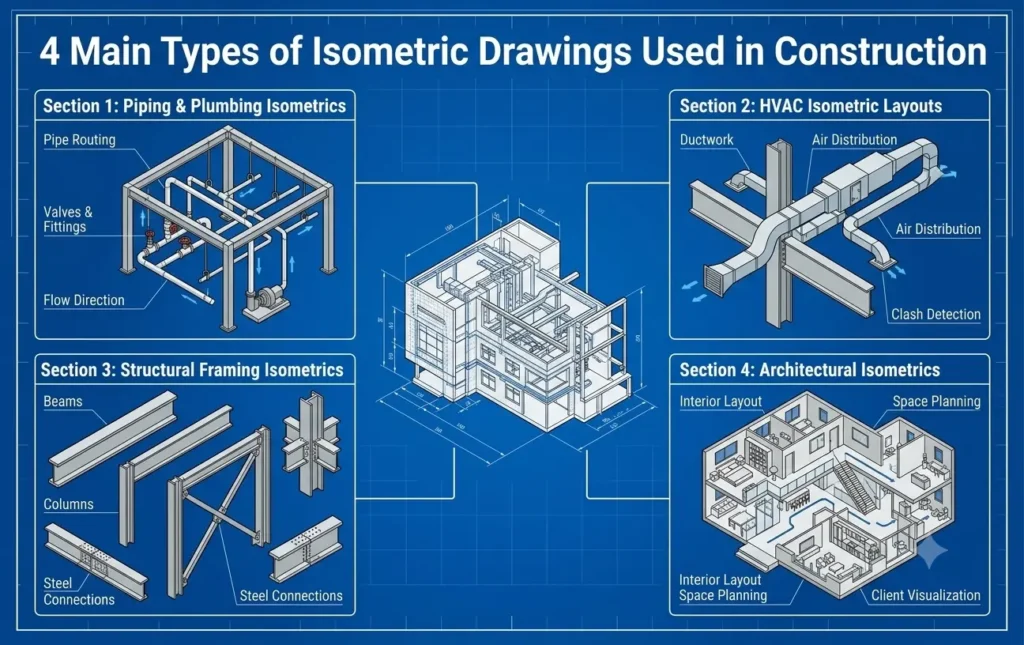
Isometric drawings distort curved or irregular shapes because they lack true foreshortening, work best on rectangular or angular objects, and can’t replace full construction documentation or true 3D models when precise fabrication or approval is required.
It’s worth being upfront about this, because isometric design often gets marketed as a near-universal solution, and it isn’t one.
- Curved shapes suffer. Without true foreshortening, circles and curves come out looking stretched unless a drafter compensates manually.
- It’s a 2D representation, not a real 3D model. An isometric drawing shows one fixed viewing angle, and it can’t be rotated the way an actual 3D or BIM model can.
- It doesn’t replace construction documents. For coordination, fabrication, or approvals, isometric views are used alongside plans, elevations, sections, and specifications, never as a standalone substitute.
None of this makes isometric design less useful. It just means knowing where its edges are, exactly the judgment a professional drafting team brings to a project instead of figuring it out mid-deadline.
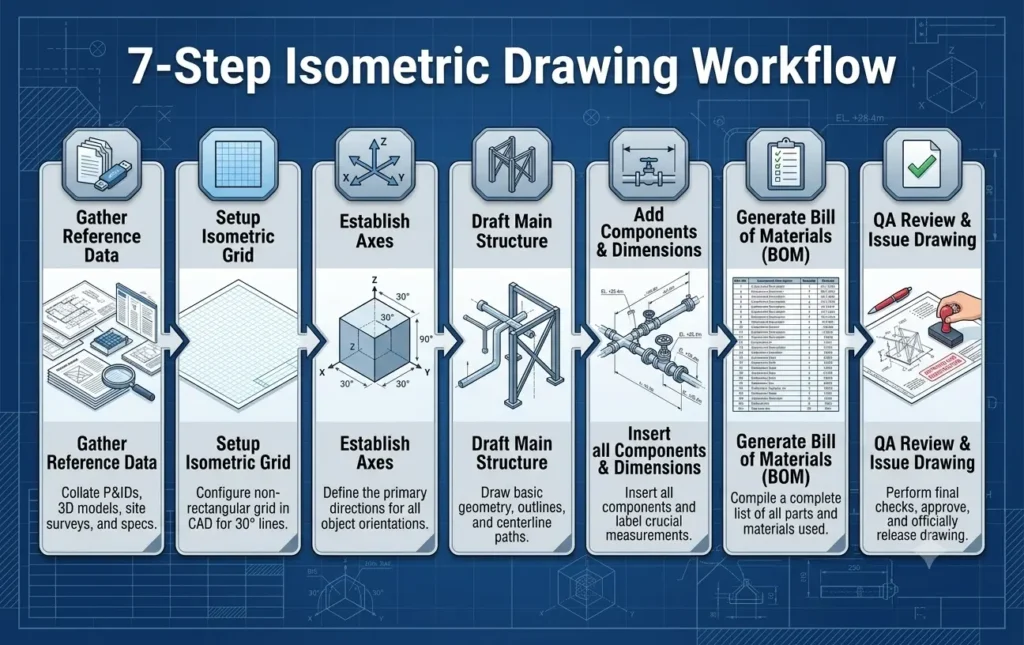
How Do CAD Drafters Actually Create Isometric Drawings?
CAD drafters create isometric drawings either by switching a 2D AutoCAD workspace into isometric mode using the ISOPLANE command and isometric snap settings, or by generating the view automatically from a 3D model in software like Revit, SolidWorks, or Fusion 360.
There are two real workflows here, and knowing which applies changes how a drafter approaches the sheet.
Manual Isometric Drafting in AutoCAD
AutoCAD still supports true manual isometric drafting for drafters building a view from scratch, and it is common on piping and shop-drawing work. Turning on Isometric Snap locks the crosshair to 30°, 90°, and 150° angles instead of a standard grid. From there, the ISOPLANE command (or the F5 key) toggles between the Left, Top, and Right isoplanes, letting a drafter switch which “face” they’re drawing on without breaking the 120° geometry.
Automatic Generation from 3D and BIM Models
Revit and SolidWorks take a different approach. Instead of drawing an isometric view by hand, the software generates it directly from an existing 3D model, and the view updates as the model changes. This reduces the risk of a drawing falling out of sync with the design, one reason BIM-based workflows have become the default on larger projects, a shift covered in more depth in this breakdown of Revit vs. AutoCAD and where each tool fits best.
Other Tools Worth Knowing
Fusion 360 and SketchUp offer quick isometric view presets for early concept work, while Illustrator and Photoshop are commonly used for isometric icons and marketing illustrations, usually starting from a downloaded grid template and built up in layers.
2026 Update: AI is Entering the Isometric Workflow
Two developments stand out this year. AI-native design tools can now generate isometric-style icons and illustrations directly from a text prompt, speeding up branding work considerably. More relevant to drafters, a new category of “isometric extraction” software has emerged for industrial and piping work, reading old scanned or PDF isometric drawings and rebuilding them into structured, editable data. This data is a genuinely useful shortcut for brownfield projects that never had a 3D model to begin with.
What Drafting Standards Apply to Isometric Drawings?
Professional isometric drawings generally follow ANSI Y14.5 in the United States and ISO 5456-3 internationally, both of which govern how axonometric and isometric views should be dimensioned, annotated, and presented on a technical drawing set.
Standards matter here for a simple reason: an isometric drawing that looks correct but isn’t dimensioned to a recognized standard can cause real problems once it reaches a contractor, fabricator, or permitting office. ANSI Y14.5 governs dimensioning and tolerancing in the U.S. and extends to how isometric views should be measured and labeled. ISO 5456-3 covers axonometric representations internationally, which matters on any project involving cross-border fabrication.
Dimensioning correctly isn’t about following a standard for its own sake; however, it changes how the drawing gets read. Dimension lines need to run parallel to the isometric axis they’re measuring, not flat horizontally or vertically the way they would on an orthographic view. Get this wrong, and an otherwise accurate drawing can still be misread on-site. It is exactly the gap between a rough isometric sketch and 2D drafting produced to AIA and ISO annotation standards from the first line.
What Are Piping Isometric Drawings, and Why Do MEP Teams Rely on Them?
Piping isometric drawings are simplified 3D-style schematics showing pipe routes, fittings, valves, and flow direction, letting plumbing, mechanical, and HVAC teams plan and fabricate systems accurately without needing a full 3D model on-site.
This is arguably where isometric drawing earns its keep the hardest. A piping isometric strips away everything except what a fabricator needs: the run, fittings, valves, flow direction, and key dimensions, laid out isometrically so spatial relationships stay clear even in a tight mechanical room.
These drawings show up constantly across plumbing, electrical, mechanical, and HVAC disciplines, especially wherever sections are prefabricated off-site and shipped in for final assembly. That process depends entirely on the isometric drawing being dimensionally correct, similar to the precision covered in this guide to what a pipe spool actually is and how it’s fabricated.
On the software side, tools like AutoCAD Plant 3D generate piping isometrics directly from a 3D plant model, and the ISOGEN engine remains an industry standard embedded inside several major piping platforms. The 2026 shift worth watching sits on the other end of the process: AI-powered extraction tools that digitize old scanned piping isometrics for brownfield facilities never modeled in 3D, unlocking decades of documentation that used to just sit as static PDFs.
Where Is Isometric Design Actually Used Today?
Isometric design shows up across branding, digital products, architecture and engineering, entertainment, and business presentations, making it one of the most versatile visual techniques still in active use.
- Architecture and engineering drawings: The technical end of the spectrum, where isometric views communicate spatial layouts clearly, often produced through dedicated 3D drafting services rather than sketched by hand.
- Logos and branding: Makes a logo feel dimensional and “buildable” without adding real complexity.
- Icons for websites and apps: Reads as more distinct and clickable than flat equivalents, especially at dashboard scale.
- Maps and wayfinding: Museums, malls, and campuses use isometric maps because they show depth (which floor, which building) far better than a flat map.
- Infographics: Lets a designer show multiple related elements without the clutter flat infographics fall into.
- Hero images and landing pages: A single well-placed illustration often explains a product before a user reads a word of copy.
- Typography: Isometric lettering gives simple text a playful, dimensional feel.
- Games, comics, and the metaverse: A staple of strategy and simulation games for decades, and increasingly showing up in metaverse-style environments too.
- Presentations: A common way to make product and corporate slide decks feel more modern than flat stock icons.
Why Is Isometric Design Trending Again in 2026?
Isometric design is trending in 2026 largely because AI tools can generate isometric icons and illustrations from a simple text prompt in seconds, while UI design is pairing isometric depth with glassmorphism for a “soft 3D” look that’s replacing years of flat-design minimalism.
Three things are driving this specifically this year.
- First, AI-native generation tools have made isometric visuals dramatically faster to produce, what used to require setting up a grid and building shapes layer by layer can now start from a text description.
- Second, icon and interface design is visibly moving past pure flat minimalism toward styles that pair isometric depth with glassmorphism’s translucent, frosted-glass look, giving interfaces a softer, more three-dimensional feel without going fully skeuomorphic.
- Third, on the drafting side, AI extraction tools are solving a genuinely old problem, turning decades of scanned, static piping isometrics into structured, usable data instead of unsearchable PDFs.
Pro Tip: If you’re evaluating an AI isometric generator for marketing assets, treat its output the way you’d treat a junior designer’s first draft, useful for speed and concepting, but still worth a manual pass to confirm the 120° geometry and proportions are actually correct before publishing.
Is Isometric Design Right for Your Project?
Isometric design works best when you need to communicate depth, structure, or spatial relationships clearly, meaning technical drawings, product visuals, and maps. But it’s the wrong choice for highly organic or curved subjects, or anywhere a strict orthographic-only standard applies.
If your project involves showing how parts relate to each other in space, for example a piping run, a building layout, or a product’s internal structure, isometric is almost always worth considering. If it leans heavily on curves or organic shapes, or needs strict single-view orthographic documentation for regulatory reasons, isometric should support that documentation rather than replace it.
For complex mechanical or piping systems specifically, this is exactly the kind of decision worth handing to a team that drafts to standard every day rather than figuring it out mid-project, which is precisely what dedicated MEP drafting services are built around.
Frequently Asked Questions About Isometric Design
What is isometric design in simple words?
Isometric design shows 3D objects on a flat 2D surface using three axes set exactly 120° apart, with no vanishing point, giving accurate, measurable proportions while still creating a real sense of depth.
What is the 120-degree rule in isometric drawing?
The 120-degree rule states that an isometric object’s three axes (X, Y, Z) must be spaced exactly 120° apart, with horizontal lines drawn at 30° from horizontal and vertical lines staying perfectly vertical.
What is the difference between isometric and orthographic drawing?
Orthographic drawing shows separate flat views, including front, top, and side, of an object, while isometric drawing combines all three dimensions into one pictorial view, making isometric technically a type of orthographic projection.
What software do CAD drafters use for isometric drawings?
CAD drafters commonly use AutoCAD (with the ISOPLANE command), Revit, SolidWorks, and Fusion 360, plus specialized tools like AutoCAD Plant 3D for piping, most of which can generate isometric views directly from a 3D model.
What is the isometric scale factor?
The true isometric scale factor is approximately 0.816, meaning real lengths should be reduced by about 81.6% along isometric axes for full geometric accuracy, though most CAD software simplifies this to a 1:1 scale.
Is isometric drawing the same as a 3D drawing?
Not quite. Isometric drawing is a fixed 2D representation that creates the illusion of three dimensions, while a true 3D model exists in real spatial coordinates and can be rotated or viewed from any angle.
What are isometric piping drawings used for?
Isometric piping drawings show pipe routes, fittings, valves, and flow direction in a clear layout, helping plumbing, mechanical, and HVAC teams plan, fabricate, and install piping systems without needing a full on-site 3D model.
Can isometric drawings replace construction documents?
No. Isometric drawings support visualization and coordination, but they’re normally used alongside plans, elevations, sections, and specifications rather than as a standalone replacement for complete construction documentation.
Who invented isometric drawing?
Isometric drawing was formally developed in 1822 by British scientist William Farish, who created it as a mathematically consistent method for technical illustration — a technique still standard in engineering and CAD drafting today.
What’s the difference between isometric and dimetric projection?
Isometric projection has all three axes at equal 120° angles, while dimetric projection has only two axes equal and one different, making isometric more symmetrical and dimetric slightly better for emphasizing a single face.
Final Thoughts
Isometric design sits in an unusual spot, simple enough that a marketer can use it to make a landing page more engaging, and precise enough that an engineer can hand it to a fabricator as a working document. That range is why it’s stuck around since 1822, and why it’s still evolving today, from AI-generated icons to extraction software rebuilding decades-old piping drawings.
But the geometry that makes isometric drawings useful, the 120° axes, the correct scale factor, standards-compliant dimensioning, is also where mistakes are easiest to make under a tight deadline. That’s the gap CAD Drafters exists to close. Our team produces isometric, orthographic, piping, and full BIM models that are code-compliant from the first line, built by real drafters rather than automated templates, within a few hours and with the revisions that never mean starting a sheet over.
| Ready to get an isometric drawing done right the first time?
Get a free quote from CAD Drafters and let a dedicated drafting team handle the geometry while you handle the project! |